How to Install and Adjust a Valve Limit Switch Box
1. Tools Required
| Tool | Purpose |
|---|---|
| 2.5mm or 3mm hex key | Remove actuator top cover / cam screws |
| 4mm or 5mm hex key | Mounting bolts |
| Small flathead screwdriver | Terminal wiring |
| Multimeter | Continuity test |
| Marker pen | Mark cam positions before adjustment |
| 24V DC source (optional) | Test proximity sensors |
2. Pre-Installation Checks
| Check | Action |
|---|---|
| Actuator type | Confirm ISO 5211 mounting pad (F05/F07/F10/F12/F14) |
| Shaft coupling | Limit switch box shaft must mate with actuator drive |
| Valve stroke | Confirm 90° rotation (standard butterfly valve) |
| Environment | Verify IP rating matches installation location |
| Cable entry | Check PG13.5 or M20 threads match conduit/cable gland |
Compatibility note: KINKO limit switch boxes use NAMUR VDI/VDE 3845 mounting – compatible with 90% of pneumatic and electric actuators.
3. Mounting Procedure (5 Steps)
| Step | Action | Detail |
|---|---|---|
| 1 | Remove actuator top cover | Access shaft and mounting holes |
| 2 | Align limit switch box shaft | Engage with actuator drive slot |
| 3 | Hand-tighten mounting bolts | Use supplied M5 or M6 screws |
| 4 | Torque bolts crosswise | 3–5 Nm (aluminum) / 2–3 Nm (plastic) |
| 5 | Verify shaft engagement | Rotate manual override – indicator dome should turn |
Critical: Do not force bolts. If alignment is off, use a centering ring or adapter (KINKO supplies with kit).
4. Cam Adjustment (Mechanical Switches)
4.1 Understanding Cam Arrangement
| Cam Position (bottom to top) | Typical Function |
|---|---|
| Cam 1 (lowest) | Valve closed position |
| Cam 2 (middle) | Valve open position |
| Cam 3 (highest, optional) | Mid-travel or alarm |
4.2 Step-by-Step Calibration
| Step | Action |
|---|---|
| 1 | Apply air or power to move valve to fully closed position |
| 2 | Loosen cam 1 set screw (typically 2.5mm hex) |
| 3 | Rotate cam 1 until you hear/feel the switch click |
| 4 | Tighten set screw |
| 5 | Move valve to fully open position |
| 6 | Loosen cam 2 set screw |
| 7 | Rotate cam 2 until switch clicks |
| 8 | Tighten set screw |
| 9 | Cycle valve 3 times – verify clicks at correct positions |
Precision tip: For critical applications, use a multimeter on continuity mode to identify exact switch activation point.
4.3 Cam Adjustment Diagram (Text Reference)
text
复制
下载
        Top of box
           │
    ┌──────┴──────┐
    │   Dome      │
    │             │
    │  Cam 3 (mid)│ ← Optional
    │  Cam 2 (open)│ ← Adjust at 90°
    │  Cam 1 (closed)│ ← Adjust at 0°
    └─────────────┘
        │
   To actuator shaft
5. Wiring Verification (Mechanical Switches – Dry Contact)
5.1 Terminal Identification (Typical 2-Switch Box)
| Terminal | Label | Function |
|---|---|---|
| 1 | COM 1 | Common for switch 1 (closed position) |
| 2 | NC 1 | Normally closed (opens when valve closed) |
| 3 | NO 1 | Normally open (closes when valve closed) |
| 4 | COM 2 | Common for switch 2 (open position) |
| 5 | NC 2 | Normally closed (opens when valve open) |
| 6 | NO 2 | Normally open (closes when valve open) |
5.2 Continuity Test (Valve Closed)
| Valve Position | Switch 1 (closed) | Switch 2 (open) |
|---|---|---|
| Closed | COM 1 to NO 1 = Closed (0 ohms) | COM 2 to NC 2 = Closed |
| Open | COM 1 to NC 1 = Closed | COM 2 to NO 2 = Closed |
5.3 Wiring to PLC (Typical)
| Connection | Terminal | Wire to PLC |
|---|---|---|
| Valve closed signal | COM 1 | 24V DC common |
| Valve closed signal | NO 1 | Digital input 1 |
| Valve open signal | COM 2 | 24V DC common |
| Valve open signal | NO 2 | Digital input 2 |
No external power needed for dry contacts – PLC provides low-voltage across the loop.
6. Proximity Sensor Wiring (PNP Example)
| Wire Color | Function | Connection |
|---|---|---|
| Brown | +24V DC (power) | 24V power supply |
| Blue | 0V (common) | Power supply common |
| Black | Signal output | PLC digital input (PNP type) |
PLC configuration: Input must be PNP (sourcing). NPN sensors require different wiring.
6.1 Proximity Sensor Test
| Condition | Multimeter Reading (Black to Blue) |
|---|---|
| Sensor not activated (target away) | 0V |
| Sensor activated (metal target present) | 24V DC |
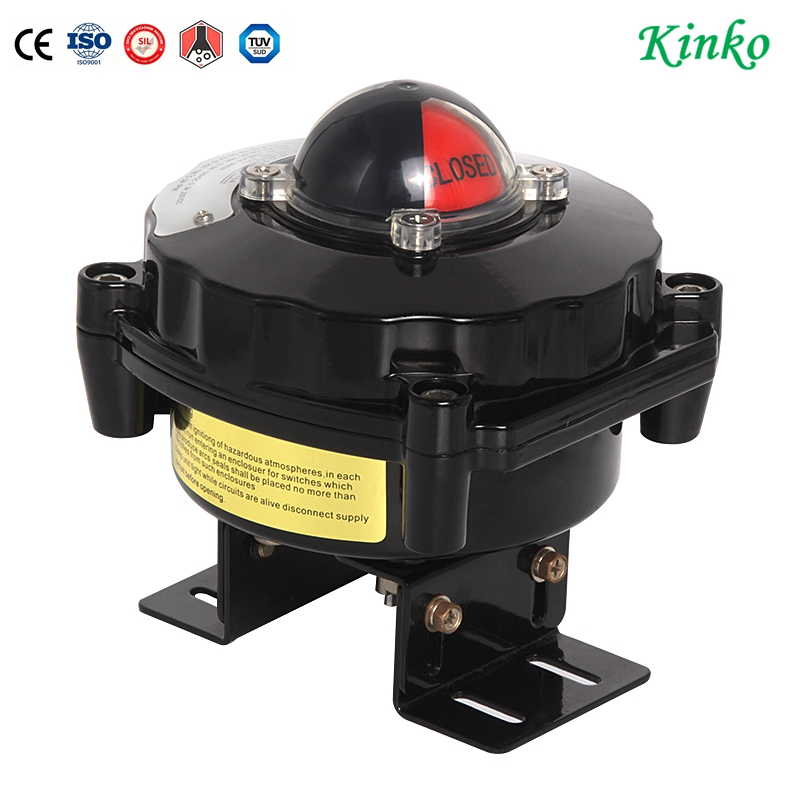
7. Visual Indicator (Dome) Adjustment
| Problem | Solution |
|---|---|
| Dome shows opposite color | Rotate dome 180° and reinstall |
| Dome does not rotate | Check engagement slot – realign with cam shaft |
| Dome stuck in one color | Cam screw loose – recalibrate |
| No color change | Internal flag disconnected – replace dome assembly |
Typical color convention:
| Valve Position | Dome Color |
|---|---|
| Closed | Green |
| Open | Red |
| Mid-travel | Yellow (if equipped) |
8. Final Commissioning Checklist
| # | Check | Pass |
|---|---|---|
| 1 | Mounting bolts tightened (no wobble) | ☐ |
| 2 | Shaft engages fully (dome turns with actuator) | ☐ |
| 3 | Valve closed – switch 1 activates | ☐ |
| 4 | Valve open – switch 2 activates | ☐ |
| 5 | Multimeter confirms continuity at correct terminals | ☐ |
| 6 | Wiring tight – no stray strands | ☐ |
| 7 | Cable gland sealed (IP67 maintained) | ☐ |
| 8 | Dome color matches valve position | ☐ |
| 9 | Cycle valve 5 times – no false signals | ☐ |
| 10 | PLC receives correct open/closed status | ☐ |
9. Common Installation Errors & Fixes
| Error | Symptom | Fix |
|---|---|---|
| Shaft not engaged | Dome does not rotate when valve cycles | Remove box, verify coupling alignment |
| Cams reversed | Open signal when valve closed | Swap cam 1 and cam 2 positions |
| Cams too tight | Switch clicks prematurely | Loosen cam, adjust at exact end position |
| Wrong switch used | No signal at PLC | Verify NO vs NC wiring |
| Overtorqued bolts | Box cracked or warped | Replace box; torque to spec |
| No seal on cable entry | Moisture inside box | Add cable gland or sealing plug |
10. Quick Troubleshooting Table
| Symptom | Likely Cause | Solution |
|---|---|---|
| No signal at PLC | Wiring loose or wrong terminal | Check continuity from terminal to PLC |
| Signal always ON | Cam screw loose – cam moved | Re-calibrate cams |
| Intermittent signal | Switch failing or vibration | Replace microswitch |
| Both signals ON simultaneously | Cams overlapping | Re-calibrate with margin between cams |
| Dome color wrong | Dome installed 180° off | Rotate dome |
| Signal OK but PLC sees opposite | NO/NC reversed | Swap wiring or change PLC logic |
11. Maintenance After Installation
| Interval | Action |
|---|---|
| First week | Re-check cam screws after thermal cycling |
| Monthly | Verify dome rotation; listen for switch click |
| Quarterly | Check cable gland tightness |
| Annually | Open box – inspect for moisture or corrosion |
| Every 500k cycles | Replace mechanical microswitches |
12. KINKO Installation Support
| Service | What We Provide |
|---|---|
| Pre-mounted option | Limit switch box installed and calibrated at KINKO factory |
| Wiring diagram | Tailored to your PLC type (PNP/NPN/dry contact) |
| Spare cams and switches | Available as replacement kit |
| Technical video | QR code on box links to installation video |
KINKO factory pre-set: Order your actuated valve with limit switch box pre-mounted and calibrated – ready to wire upon delivery.
Need a limit switch box installed on your KINKO actuated valve? Specify your actuator model and PLC input type – we pre-configure and test before shipping.
Ivan (Mobile:+86-18968769287)
WhatsApp:+86-13579991606
Wechat:+86-18968769287
Website: www.kinko-flow.com
ZHEJIANG KINKO FLUID EQUIPMENT CO.,LTD
